
DEVCLASS AD
Microsoft open sources XAML Studio amid developer discontent with Visual Studio designers
In another twist to Visual Studio’s long-running designer drought, the near-forgotten XAML Studio has been open sourced – though this is unlikely to satisfy developers still waiting for visual designers in Microsoft’s premier development environment.
Microsoft veteran Michael Hawker, a senior software engineer on the scale and incubation team, has spent years developing XAML Studio through Microsoft Garage, the company’s experimental projects division. The tool evolved from an earlier experiment called XamlPad.
DEVCLASS AD
XAML Studio is not quite a visual designer but is lightweight and responsive, with IntelliSense and live preview, as well as handy links to documentation on WinUI elements. The idea is that developers design a user interface (UI) in XAML Studio and then use copy and paste to get the designs into Visual Studio.
Developers may have presumed that XAML Studio was abandoned. Version 1.1 was released in late 2019 and is still the current offering in the Microsoft Store. According to Hawker though, he has been attempting to open source it since 2020, and has only now achieved it with help from the .NET Foundation, which he says has adopted it as a “seed project”.
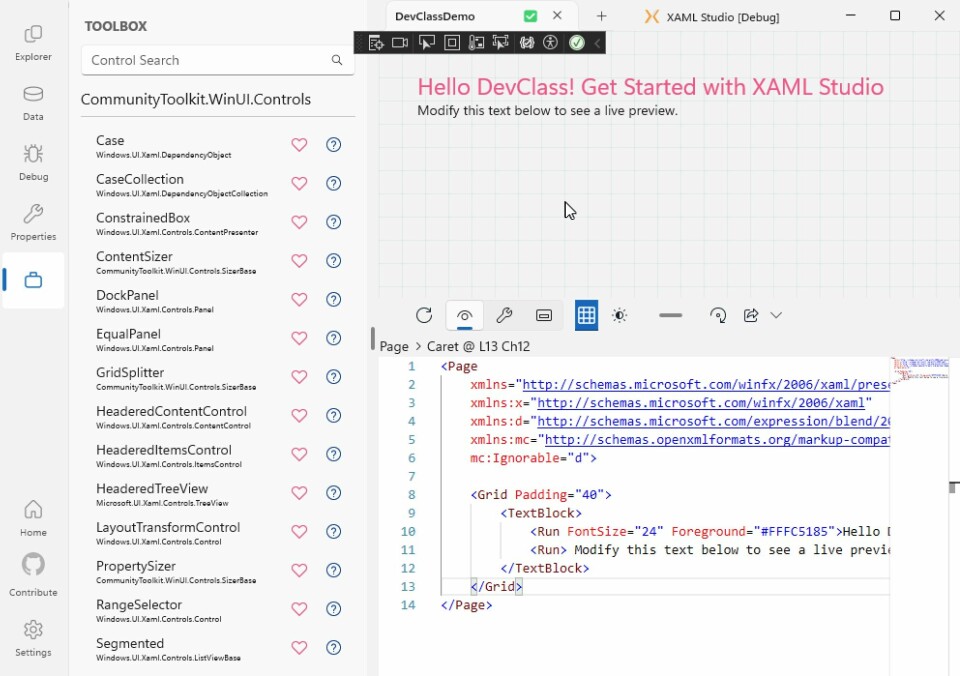
Work on XAML Studio 2.0 is in progress, with an updated design based on Microsoft’s Fluent UI design language, and support for WinUI 3 components. We were able to get the latest pre-beta code for 2.0 to run in Visual Studio 2026 on an Arm 64 version of Windows, though only the x86 build and only when debugging in Visual Studio. It is worth using the latest code despite issues, since version 1.1 is out of date. The roadmap includes “building for (Modern) UWP and WinUI 3 together as part of single SDK-style modern project.”
DEVCLASS AD
We observe though that XAML Studio currently looks like a one-person project; perhaps not surprising since it has only just emerged into open source, but Hawker will need to build a community around it for any chance of future significance.
Those not familiar with the intricacies of Microsoft’s XAML-based UI frameworks must note that UWP (universal windows platform) components are different from WinUI 3 components, that WinUI 3 is very different from WinUI 2, and these are different again from the cross-platform MAUI flavor of XAML.
The early success of Windows was in part built on the ease of creating Visual Basic applications using drag-and-drop tools. Today the primary framework for Windows desktop applications is supposedly WinUI 3, but this has no visual designer.
A note in the documentation states that “WinUI 3 / .NET MAUI XAML designer is not supported in Visual Studio … use XAML Hot Reload.”
A feature request for a visual designer for WinUI 3 is one of the top feedback issues and still technically “under review”, but looks unlikely to be met. An update in February last year extended Live Preview and Hot Reload to design time, potentially making XAML Studio less necessary but still not satisfying those looking for a true visual designer.
As for the cross-platform .NET MAUI, Microsoft reported in September that “a drag-and-drop UI designer is not part of our direction for .NET MAUI.”
Developers wishing for the native look and feel of Windows 11 will want to use WinUI 3, but considering the above problems, many who want only to be as productive as possible in creating line of business applications for Windows are more likely to use the ancient (but somewhat revived) Windows Forms or Windows Presentation Foundation frameworks instead.