
DEVCLASS AD
Microsoft previews command-line tool created because calling modern Windows APIs is too difficult
Microsoft has introduced a command-line tool called winapp, which attempts to address the complexity of calling the latest Windows APIs for developers not using Visual Studio.
The issue, says the Windows team, is that “Windows development often involves managing multiple SDKs, creating and editing multiple manifests, generating certificates and navigating intricate packaging requirements.”
DEVCLASS AD
The winapp CLI (command line interface) both prepares a development environment and configures application code to support modern Windows APIs, without the need for Visual Studio.
Although not itself an AI tool, the recent Windows AI APIs are among those unlocked by the winapp CLI, including use of Phi Silica, a local language model in development and available on Copilot+ PCs which have an NPU (neural processing unit).
The rationale for the winapp CLI is itself complicated. Windows is a multi-faceted platform which has both a classic Win32 API (now simply called the Windows API) which dates back to the early days of Windows, and a modern API which supports newer features of Windows including the WinUI user interface framework, Windows AI APIs, notifications and widgets.
DEVCLASS AD
This division is reflected in the existence of two Windows SDKs (software development kits), the classic Windows SDK and the modern Windows App SDK.
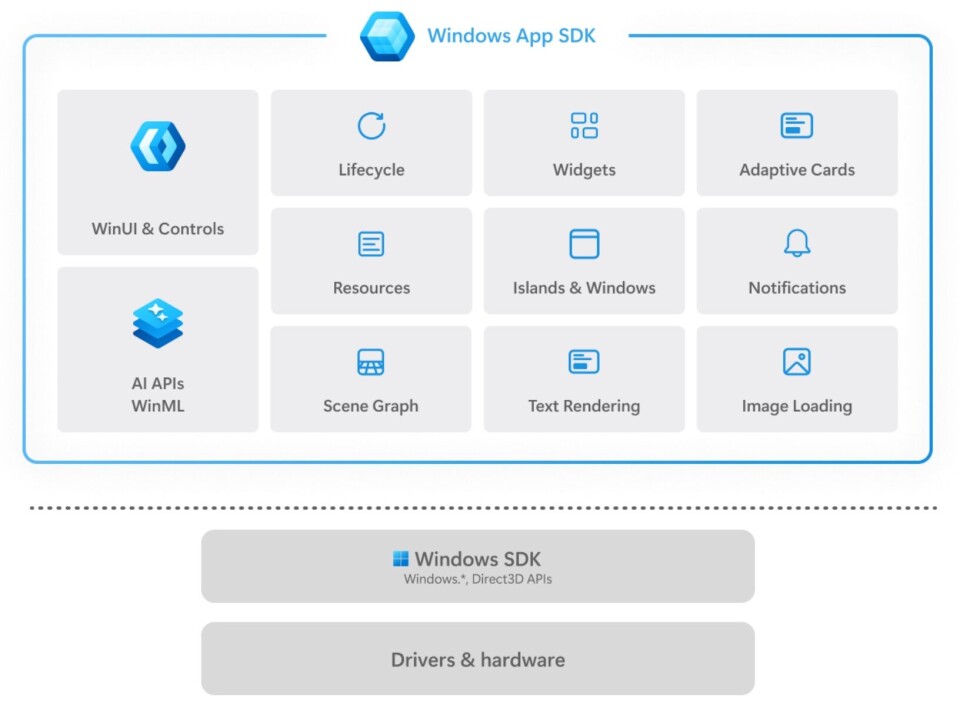
Historically most Windows developers have used Visual Studio, but given the need to support mobile platforms and Macs, cross-platform development is popular, where developers are more likely to use Visual Studio Code (VS Code) or other development tools. In this scenario, building applications that run on Windows is easy, but making use of modern Windows APIs is challenging, the result being applications that do not use many of the features available. This can be construed either as a problem for developers, whose applications are less rich than they could be, or a problem for Microsoft, as those applications do not show off Windows to best advantage.
A large part of the problem is that some elements of the Windows App SDK can only be used by what Microsoft calls app packaging. “Many Windows extensibility features – including background tasks, notifications, live tiles, custom context menu extensions, and share targets – can be used by an app only if that app has package identity at runtime,” the docs state. Achieving package identity requires not only a signed application but also one that is packaged using MSIX, the modern evolution of MSI (Microsoft Installer) packages. Visual Studio handles this for developing and debugging, but it is not so easy using other tools.
Using winapp, developers can type:
winapp create-debug-identity my-app.exe
and the tool will manage creating package identity automatically. There is particular support for Electron, a framework for building cross-platform apps with JavaScript, HTML and CSS, and which is also used by VS Code itself.
The initial developer reaction to winapp is telling, with as much bemusement as there is interest in taking advantage of the new tool. “I read it as WinApp and got excited. How disappointing,” said one. Others felt that there could be confusion between winapp and the new remote desktop client called Windows App.
DEVCLASS AD
Microsoft has something of an uphill battle even getting developers to use WinUI, let alone other modern APIs. “Check WinUI Github repo discussions and open issues to have an idea how bad it is,” said another comment on the news.
These comments show, perhaps, that Microsoft is correct in thinking that modern Windows desktop development is too complicated. While the new tool may help a little, it will not fix the underlying problem.